CASE STUDY · MICROSOFT CAPSTONE · UW HCDE
Helping finance teams review and document their work
For a capstone sponsored by Microsoft, our team explored how AI could support financial compliance work in Excel.
I led product scoping, research, and requirements. My focus was turning what we learned from finance professionals into clear priorities for a prototype the team could test.
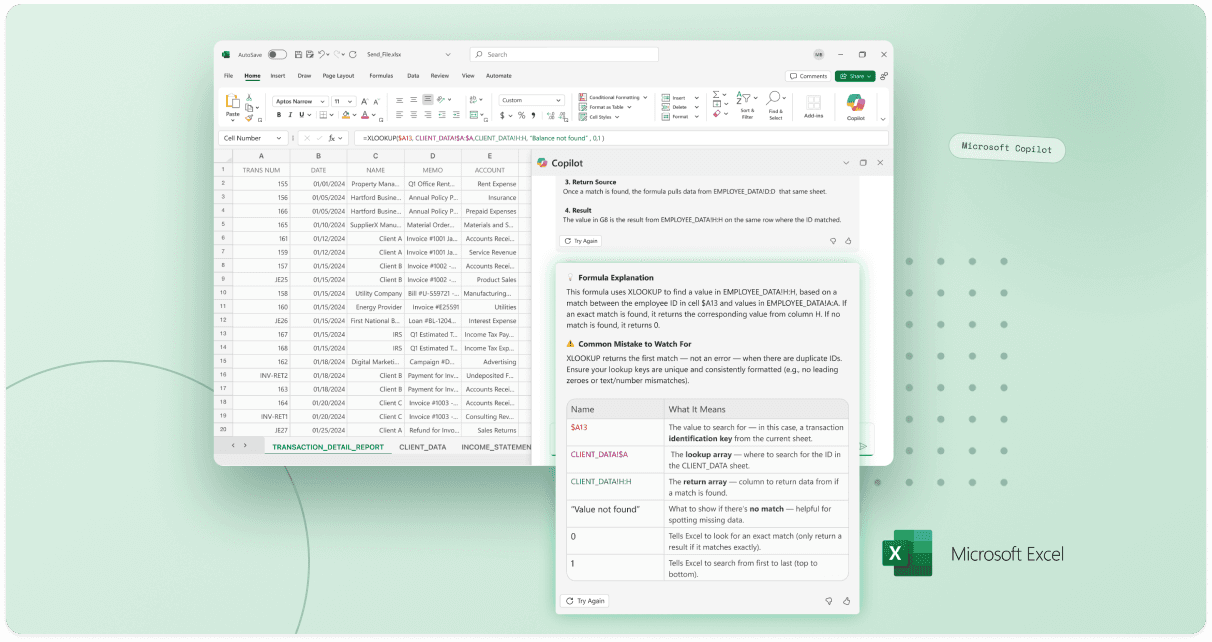
I helped the team focus on the handoff between workbook preparers and reviewers. Research informed three prototype features, and later sessions showed that participants wanted to check sources and edit AI output before sharing it. I used that feedback to refine the product requirements.
Finding a specific problem within a broad brief
The sponsor brief asked how AI could support B2B financial services. I narrowed our focus to SOX compliance work in Excel, where people already prepared and reviewed financial documentation. This gave us a specific workflow to investigate: how someone explains their work and how a colleague checks it. I wanted our requirements to come from the problems in that handoff.
Understanding the work behind the spreadsheet
With that handoff in mind, I wanted to understand where people lost time and what they needed from each other. I wrote the interview protocol, led sessions, and synthesized the findings with Riva’s support. The research helped us map the workflow and compare potential features.
“It takes a while just to filter through different columns.”
“A single unintentional keystroke can produce inaccurate results.”
“The help section never helps.”
“I often just Google what the error means.”
“Sometimes it’s annoying because the salespeople just put random names, and I gotta go in and fix them one by one.”
“I spend a lot of time tracking down odd financial activities.”
“So much of my day is spent on repetitive tasks that scream for automation.”
“It’s tedious but necessary when recreating templates across sheets.”
Preparer
1
Updates workbook, makes changes
2
Adds notes and comments by hand
3
Shares over email or Teams, no standard summary
4
Meets with the reviewer to walk it through
→
HANDOFF
←
Reviewer
1
Digs through sheets to find what changed
2
No logic trail or version history
3
Compliance notes scattered across emails and chats
4
Follows up for clarification
Across fifteen research conversations, I mapped a handoff that depended on manual notes and repeated clarification. This focused our requirements on making changes, sources, and explanations easier to review.
Turning findings into priorities
I compared potential features by frequency, impact, AI fit, and workflow stage. This gave the team a shared way to discuss which problems were worth focusing on in the prototype.
Giving the team a clear direction to prototype
Those priorities became Formula Explanation, Trace Document, and Workbook Summary. I translated the research into requirements and contributed to the design and prototype, while Christina and Michael led interface design. Together, the three features gave us something concrete to take back to participants.
Christina Sa and Michael Bui led interface design. I contributed to the design and prototype alongside product requirements.
Using feedback to refine the requirements
We returned to the people we had interviewed with the three features already in the prototype. Their feedback helped us refine how those features should work. Participants saw potential time savings, but wanted to verify sources, edit the output, and understand which comments came from AI.
Participants saw value in workbook summaries and formula explanations. They also liked that AI comments were visually distinct from human notes.
Participants wanted editable output, clearer labels, and source links that identified the sheet and cell.
“This would save me hours.”
Participant, on Workbook SummaryI turned that feedback into specific requirements for editing, source links, and clearer labels. I also captured what to keep, including the visual distinction between AI and human comments that participants already valued.
WHERE THE PROJECT LANDED
~30%
estimated reduction in documentation time, based on participants’ expectations after reviewing the prototype.
We also presented the prototype at the HCDE conference, sharing our work with other professionals. The project concluded with a prototype and refined requirements for how AI could support review and documentation.
Keeping the team aligned as requirements evolved
Requirements were only useful if the team and sponsor could follow why they changed. I maintained a shared record of research, decisions, feedback, and next steps so discussions could lead to clear actions.
Project management: Throughout the project, I managed our requirements, deliverables, and sponsor communication in Notion. The shared workspace gave the team and Microsoft a place to review progress, record feedback, and track what needed to happen next.
THE TEAM
Interface design: Christina Sa and Michael Bui. Research support: Riva Li.
MY PRIMARY ROLE
Product scoping and requirements, research planning and sessions, synthesis, usability planning, sponsor communication, and team coordination.
I also contributed to the design and prototype, with product management and requirements as my main focus.
Turning research into decisions a team can use
The project reinforced how much product direction depends on understanding what people need to check, edit, and share. It also showed me where earlier concept testing could have helped us make decisions before investing in a fuller prototype.
CoPilot began with a broad question about AI in financial services. I helped turn it into a specific workflow, a prototype, and requirements grounded in how people review and share financial work. Participants saw potential time savings, but wanted control over the output. My contribution was connecting that research to product decisions the team and sponsor could understand and act on.